
Runtime
The same logic can behave differently in different runtimes.
Eighteen languages are eighteen tools, not eighteen rankings. Start with runtime, ecosystem, performance, safety and maintenance, then validate with a small project.
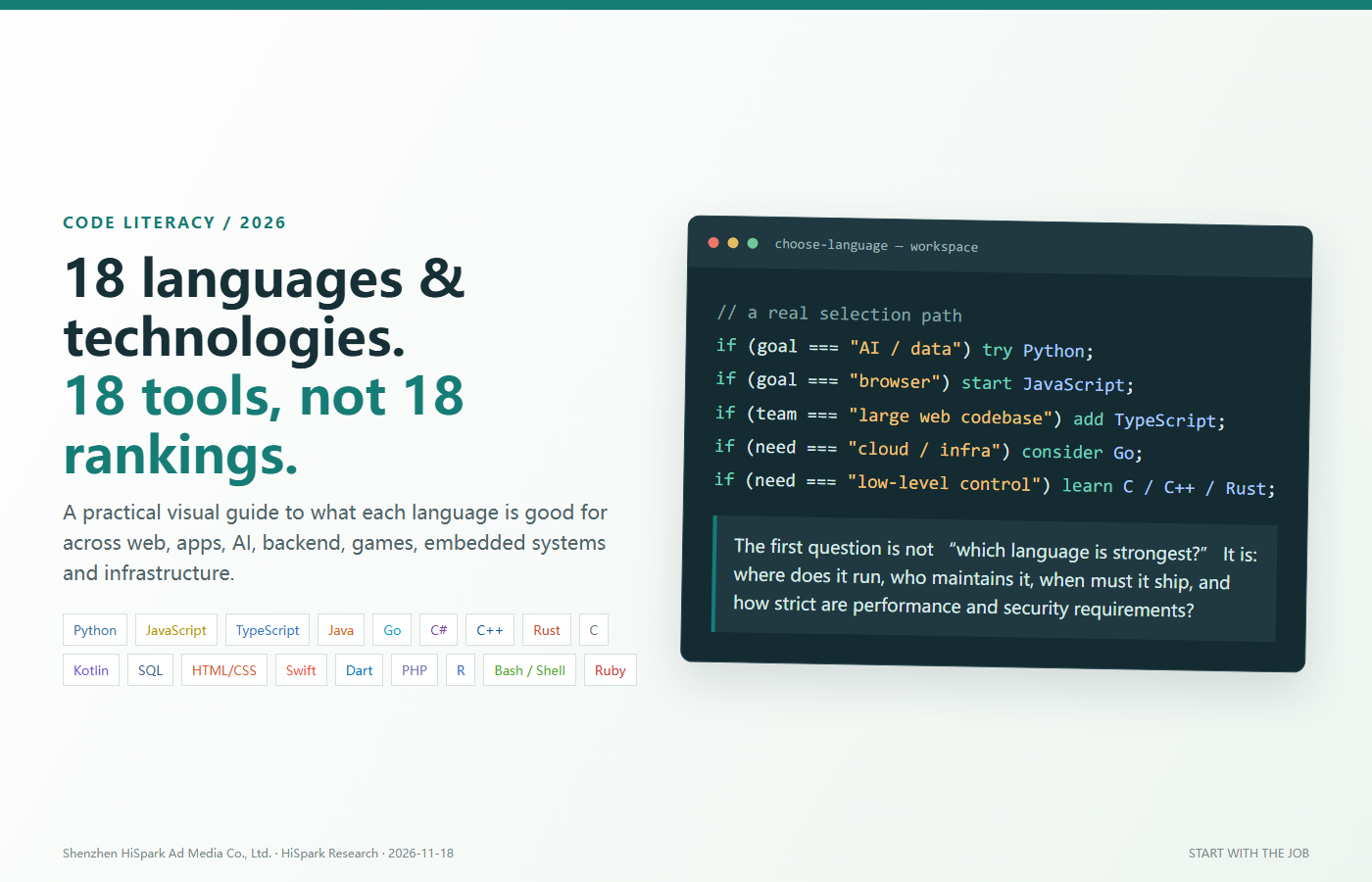
Choose the context first, then the language. Build a small working project before chasing mastery.
The first programming question is often “which language is best?” It sounds direct, but it is the wrong starting point. A language is a tool: a drill is not better than a screwdriver, and a language is not better merely because it ranks higher in a survey.
Python, JavaScript, TypeScript, Java, Go, C#, C++, Rust, C and Kotlin can all produce excellent software. What differs is the runtime, ecosystem, learning curve, performance envelope and type of team each one tends to fit. A good decision starts with the work, then narrows the shortlist.
Start with the runtime and the job. This map groups languages by the work they most often serve.
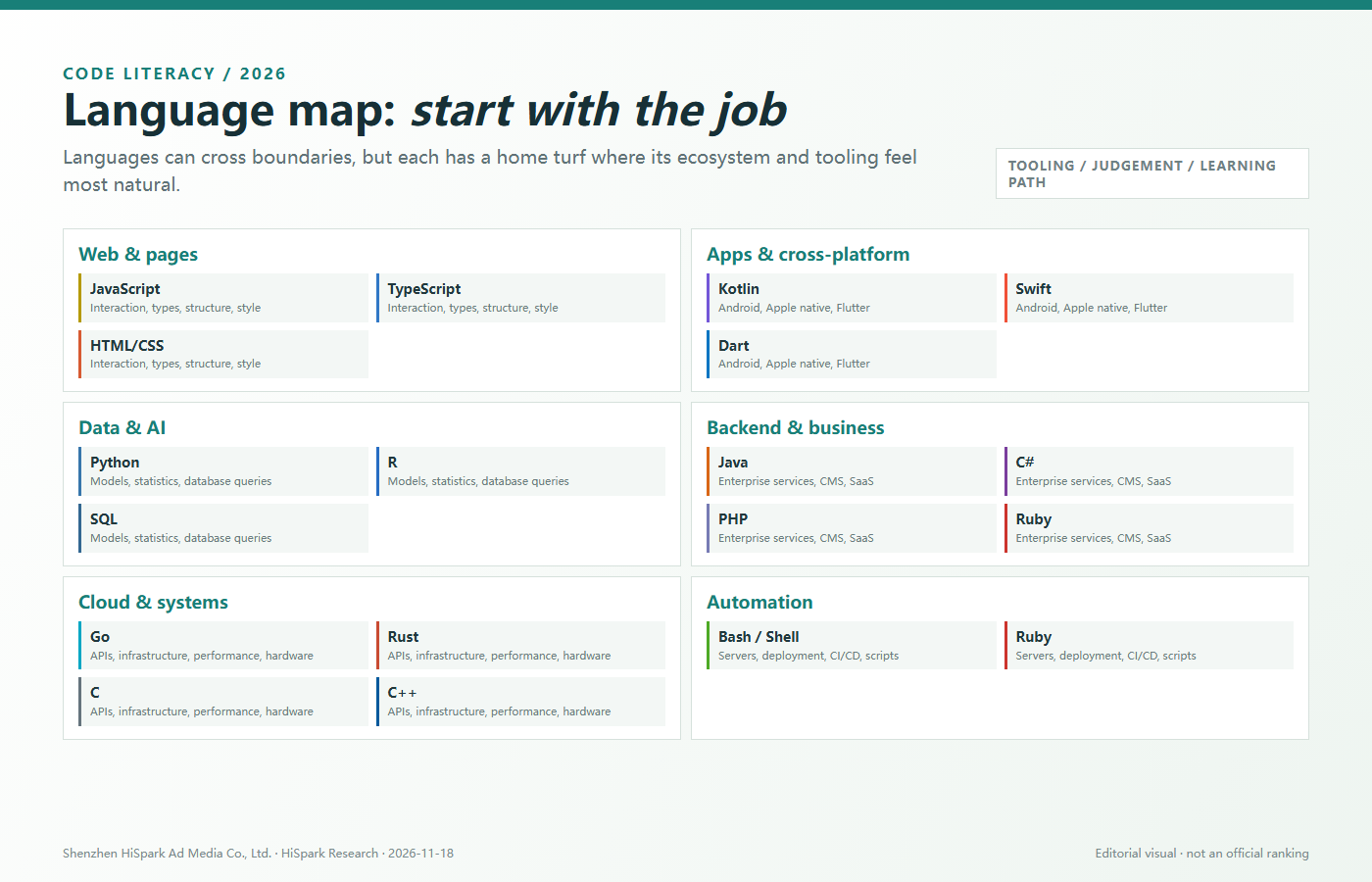
This guide organises 18 languages and web foundations by the work they solve most naturally, including boundaries, fit and a practical first step.
Before comparing languages, separate four ideas: syntax is only the entry point; delivery also depends on runtime, tooling and ecosystem.
The same logic can behave differently in different runtimes.
Types describe data and help teams catch some errors before runtime.
Frameworks, libraries, tools, docs, community and hiring all affect velocity.
Code has long-term value only when it can be read, tested, changed and handed over.
For each language: home turf, boundaries, who it fits and a practical first step.
The general-purpose language that gets ideas running quickly
AI and machine learning, data analysis, automation, web backends, operations tooling and prototypes.
Pure Python is rarely the fastest choice for extreme computation. Browser frontends and mobile apps are not its main field. Dynamic typing needs discipline, tests and type hints in larger teams.
Who fits
Beginners, analysts, AI engineers, automation teams and product groups that need fast validation.
First step
Create a small project that reads a CSV, cleans the data, produces a chart and exposes one simple FastAPI endpoint.
The native language of the browser and a practical full-stack entry point
Web interaction, frontend applications, Node.js services, real-time collaboration, visualisation and cross-platform UI.
Dynamic behaviour can move errors to runtime. The frontend toolchain changes quickly. Large projects need conventions, tests and often TypeScript.
Who fits
Web developers, full-stack teams, interactive products, dashboards and teams launching an MVP quickly.
First step
Build a small browser tool: collect form input, call an API, show the result and add error handling plus mobile layout.
A type guardrail for large JavaScript systems
Large frontends, Node.js services, component libraries, SDKs and codebases maintained by multiple people.
Types mostly help at compile time; external APIs and user input still need runtime validation. Build configuration and type design add cost.
Who fits
Developers with JavaScript basics who need stronger interface contracts and maintainability.
First step
Convert a small JavaScript project to strict TypeScript and type the API responses, component props and state.
A long-established JVM language for enterprise systems
Large business backends, finance, search and big-data ecosystems, existing Android code and systems requiring mature middleware.
Boilerplate can be heavy and the broader engineering stack takes time to learn. JVM memory and startup behaviour need tuning in some workloads.
Who fits
Enterprise developers, backend teams, financial systems, Android maintenance and large engineering organisations.
First step
Build a CRUD API with a mainstream framework and learn dependency injection, transactions, logs, tests and deployment.
A deliberately simple language for cloud services and infrastructure
HTTP APIs, microservices, CLI tools, container and cloud-native infrastructure, networking and services with simple deployment.
Simple syntax does not make business logic simple. GUI, data science and some AI libraries are less mature. Explicit error handling creates visible checks.
Who fits
Backend, platform, DevOps, SaaS and infrastructure teams that value deployment simplicity and concurrency.
First step
Write an HTTP service with health checks, structured logs, timeouts and database access.
A strong typed language across .NET business software and games
.NET backends, Windows desktop, enterprise applications, Unity games, cloud services and tooling.
The ecosystem still has a strong Microsoft heritage. Cross-platform support is mature, but deployment and team experience still matter. Unity and general .NET backend work require different learning paths.
Who fits
Enterprise software, Windows applications, Unity games, Azure services and teams wanting one typed language across several products.
First step
Pick one route only: ASP.NET Core API, desktop application or Unity scripting, and finish a small project in that route.
A high-control language for performance-critical systems
Game engines, graphics rendering, audio and video, browsers, quantitative trading, high-performance computing and embedded devices.
The language is large, builds can be complex and memory or object lifetime mistakes are costly. Serious projects need static analysis, sanitizers, testing and strong discipline.
Who fits
Engineers targeting games, graphics, hardware, media, HPC or low-level infrastructure.
First step
Learn pointers, memory, RAII, the standard library, CMake, debuggers and sanitizers before trying a giant framework.
Systems programming with stronger memory and concurrency safety
Systems tools, CLIs, networking and infrastructure, WebAssembly, security-sensitive services and resource-controlled concurrent systems.
Ownership, borrowing and lifetimes are real hurdles. Compile-time rules can slow early prototypes. The ecosystem is growing quickly but some industries remain better served elsewhere.
Who fits
Developers with prior programming experience who value reliability and are willing to accept a steep learning curve.
First step
Create a CLI with Cargo and practise Result, error propagation, ownership, borrowing and tests before tackling a large async system.
The foundation for understanding how computers really work
Operating systems, drivers, embedded systems, protocols, runtimes, compilers and software requiring direct memory control.
Memory, bounds, pointers and resource lifetime are the programmer’s responsibility. Abstraction and tooling are relatively primitive, and mistakes can become crashes or security defects.
Who fits
Embedded, hardware, OS, security and anyone who wants a real mental model of memory and machine behaviour.
First step
Learn pointers, array bounds, structs, Makefiles, GDB and memory-checking tools. Start with a small tested module.
A modern, expressive language for Android and the JVM
Native Android, JVM backends, enterprise services, Kotlin Multiplatform and projects needing Java interoperability.
Opportunities outside Android and the JVM vary by region. Build tooling and coroutines need study. Cross-platform does not mean every line is shared.
Who fits
Android developers, Java teams and products needing modern JVM code or shared business logic.
First step
Build a small Android app or Ktor API and learn null safety, coroutines, dependency injection and testing.
The language for querying and changing relational data
Reports, admin systems, analytics, data warehouses, business systems and any workflow that reads or updates relational data.
SQL is not a general-purpose language for complete web or mobile applications. Dialects differ in functions, syntax and optimiser behaviour.
Who fits
Every developer benefits from SQL basics; data, backend, BI and operations roles need it deeply.
First step
Use a real business table to practise SELECT, JOIN, GROUP BY, window functions and indexes, then inspect query plans.
The structure and styling foundation of the web, not a general-purpose programming language
Page structure, responsive layout, typography, visual systems and accessibility across websites and web apps.
HTML describes structure and CSS describes presentation; neither owns complex business logic. Browser support, accessibility and design implementation need experience.
Who fits
Web developers, product designers, content teams, SEO specialists and anyone maintaining a business website.
First step
Build a semantic responsive page using forms, Flex/Grid, media queries and accessibility, then measure Core Web Vitals.
The modern native language of the Apple ecosystem
iOS, iPadOS, macOS, watchOS and tvOS applications with deep integration into Apple frameworks.
The main market is Apple platforms. Server and cross-platform ecosystems are smaller. App Store review, privacy and payment rules still require specialist knowledge.
Who fits
Teams targeting iPhone, iPad or Mac users and developers entering native Apple development.
First step
Build a small SwiftUI app and learn Optionals, concurrency, state management, networking and App Store release.
The primary language for Flutter cross-platform applications
One codebase for iOS, Android, web and desktop interfaces with a consistent product experience.
Its ecosystem value is closely tied to Flutter. Assess native capabilities, package size, performance and platform differences. Not every platform feature is shared.
Who fits
Small and mid-sized teams shipping both iOS and Android, cross-border tools, content apps and rapid validation projects.
First step
Use Flutter to build a list, detail page and form flow, then validate state, networking, native plugins and release.
A practical veteran of web backends and content sites
WordPress and CMS platforms, corporate websites, content systems, ecommerce plugins, small web backends and fast launches.
The ecosystem contains code of very different quality. Large projects need modern frameworks, dependency management, tests and security discipline.
Who fits
Content sites, international business websites, the WordPress ecosystem, SMB web projects and teams that need a fast backend.
First step
Use a modern PHP framework to build login, database CRUD, validation and deployment while learning security and dependency management.
A specialist language for statistics, visualisation and research computing
Statistical analysis, biostatistics, academic research, data visualisation and reports driven by rigorous statistical models.
General backend engineering is not its strength. Production performance and deployment require additional engineering. Package quality and style vary.
Who fits
Researchers, analysts, biostatisticians, finance analysts and anyone producing reproducible statistical reports.
First step
Use a real dataset to practise cleaning, descriptive statistics, visualisation, regression and a reproducible report.
The glue language for servers and command-line automation
Linux administration, file processing, log analysis, deployment scripts, CI/CD, containers and cloud automation.
Not suitable for complex business applications. Error handling and portability can be fragile. Windows environments need extra adaptation.
Who fits
Backend, DevOps, data engineering, security and anyone who works with servers.
First step
Write a deployment or backup script with argument validation, logs and fail-fast behaviour. Learn permissions and process basics first.
An expressive language focused on developer productivity for web and scripting
Fast web product development and internal tools, especially CRUD, SaaS and content systems in the Rails ecosystem.
Raw performance and concurrency are not its strongest selling points. Job supply varies by region. Dependency maintenance and long-term team capability matter.
Who fits
Startup teams that value fast delivery, web backend developers, internal-tool builders and automation script authors.
First step
Build a small SaaS flow with Rails or a lightweight framework and learn convention over configuration, tests and migrations.
Syntax is only the entry door. Here are minimal examples across all 18 languages and web technologies, but they are far from the whole engineering story.
print("Hello, world")console.log("Hello, world");const message: string = "Hello, world";
console.log(message);public class Main {
public static void main(String[] args) {
System.out.println("Hello, world");
}
}package main
import "fmt"
func main() {
fmt.Println("Hello, world")
}Console.WriteLine("Hello, world");#include <iostream>
int main() {
std::cout << "Hello, world\n";
}fn main() {
println!("Hello, world");
}#include <stdio.h>
int main(void) {
puts("Hello, world");
return 0;
}fun main() {
println("Hello, world")
}SELECT 'Hello, world' AS greeting;<!doctype html>
<h1 style="font-family: sans-serif">Hello, world</h1>print("Hello, world")void main() {
print('Hello, world');
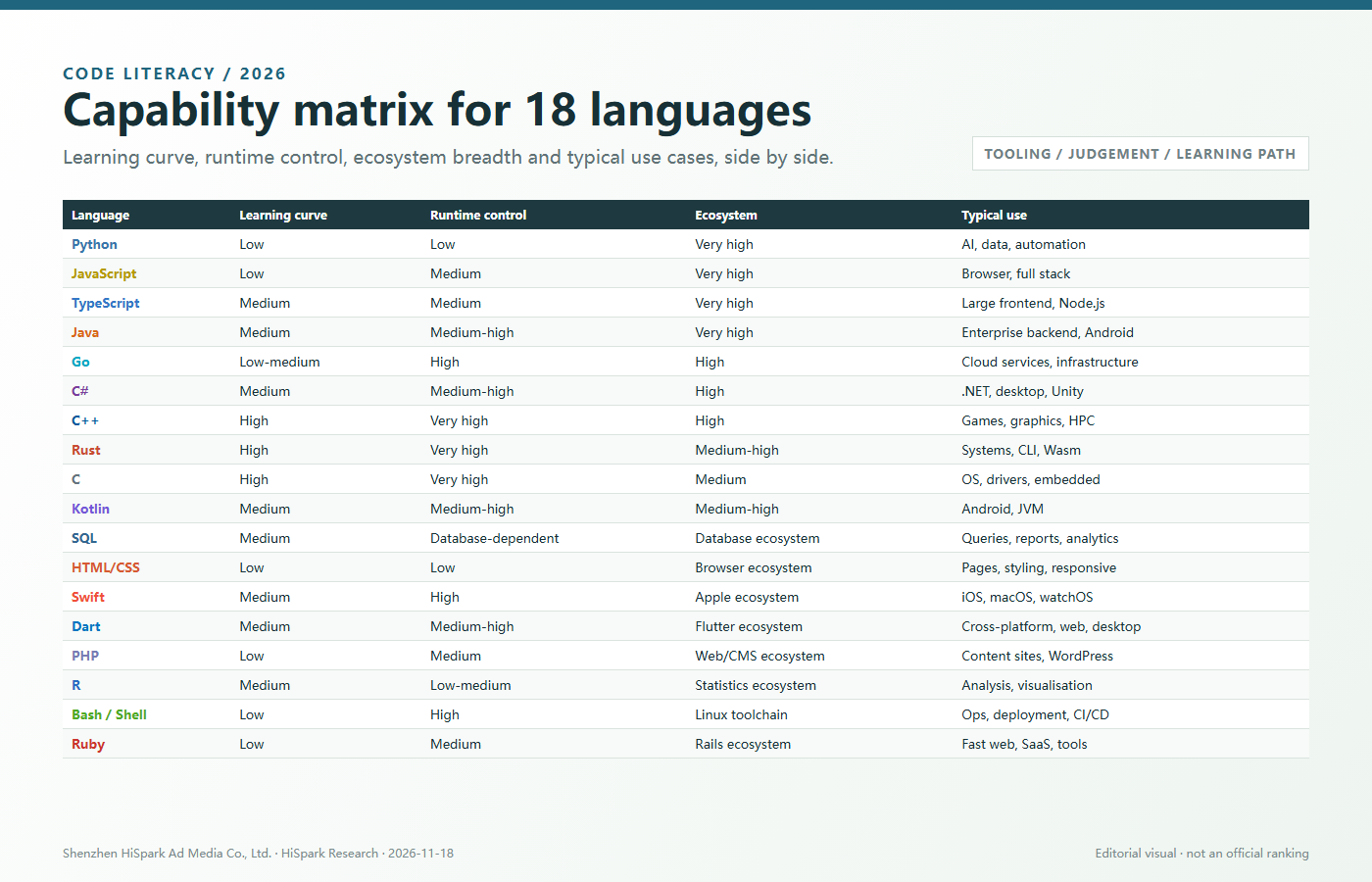
}<?php echo "Hello, world"; ?>print("Hello, world")echo "Hello, world"puts "Hello, world"This matrix sets expectations; it is not a scoreboard. Learning effort and runtime control also depend on the project, toolchain and team.
| Language | Learning | Runtime control | Ecosystem | Typical use |
|---|---|---|---|---|
| Python | Low | Low | Very high | AI, data, automation, backend |
| JavaScript | Low | Medium | Very high | Web, full stack, interaction |
| TypeScript | Medium | Medium | Very high | Large frontend, Node.js, SDKs |
| Java | Medium | Medium-high | Very high | Enterprise backend, Android, JVM |
| Go | Low-medium | High | High | Cloud services, APIs, infrastructure |
| C# | Medium | Medium-high | High | .NET, desktop, Unity, cloud |
| C++ | High | Very high | High | Games, graphics, HPC, embedded |
| Rust | High | Very high | Medium-high | Systems, CLI, infrastructure, Wasm |
| C | High | Very high | Medium | OS, drivers, embedded, protocols |
| Kotlin | Medium | Medium-high | Medium-high | Android, JVM, multiplatform |
| SQL | Medium | Database-dependent | Database ecosystem | Queries, reports, analytics, admin data |
| HTML/CSS | Low | Low | Browser ecosystem | Structure, styling, responsive layout |
| Swift | Medium | High | Apple ecosystem | iOS, macOS, watchOS, tvOS |
| Dart | Medium | Medium-high | Flutter ecosystem | Cross-platform apps, web, desktop |
| PHP | Low | Medium | Web/CMS ecosystem | Content sites, WordPress, web backend |
| R | Medium | Low-medium | Statistics ecosystem | Analysis, visualisation, research |
| Bash / Shell | Low | High | Linux toolchain | Operations, deployment, CI/CD |
| Ruby | Low | Medium | Rails ecosystem | Fast web development, SaaS, internal tools |
One requirement can have several valid stacks. These are practical starting points, not universal rules.
| Scenario | Practical suggestion |
|---|---|
| Corporate or marketing website | Use JavaScript or TypeScript for the frontend. Choose Node.js, C#, Java, Go or Python for a simple backend based on team fit. |
| Admin panel or SaaS | TypeScript is a strong frontend candidate. Java, C#, Go or Python can run the backend; maintenance experience should decide. |
| Android app | Kotlin is the first choice. Existing Java teams can migrate gradually. Cross-platform options need a separate evaluation. |
| AI tool or data product | Python handles models, analysis and experiments. TypeScript can build the product UI; Go, Java, C# or Python can serve APIs. |
| Cloud API or CLI | Start with Go and Rust, while established Java or C# platforms remain valid where the ecosystem matters. |
| Games, graphics or media | C++ remains central to many engines and real-time systems. Rust is a strong candidate for new safety-sensitive components. |
| Embedded or hardware | C is the foundation. C++ supports more complex devices. Rust is viable for new projects after checking toolchain and team support. |
| iOS app | Use Swift for an Apple-native experience. If the product must cover both iOS and Android with one codebase, evaluate Dart/Flutter or another cross-platform route. |
| WordPress or corporate content site | PHP and HTML/CSS are common foundations. Add JavaScript/TypeScript when interaction or a modern frontend becomes important. |
| BI and data reporting | SQL retrieves data, Python or R performs analysis and modelling, and HTML/CSS or frontend charting presents the result. |
| Deployment and automation | Bash handles command-line orchestration; larger services can then be implemented in Go, Python, Java or C#. |
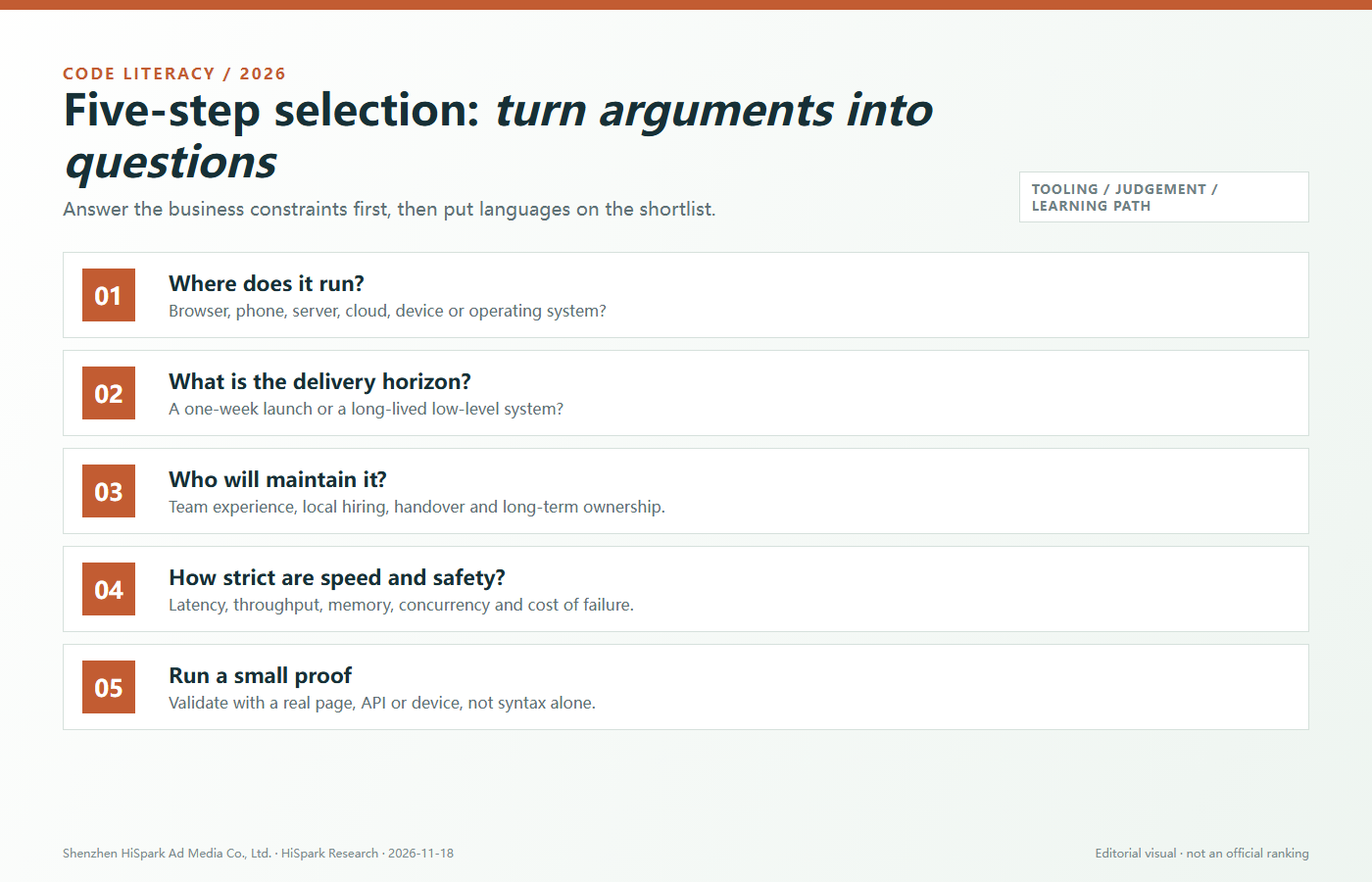
A good technical choice feels more like procurement than a fan vote. These five questions turn debate into evidence.
Browser, Android, server, cloud, game engine, embedded device or operating system narrows the first shortlist.
Existing experience, hiring, conventions, testing and handover costs often matter more than syntax.
Latency, throughput, memory, concurrency, failure cost and attack surface determine whether low-level control is required.
A fast MVP favours a mature, productive ecosystem. Long-lived infrastructure favours stability and operational clarity.
Build one page, API or hardware proof and record delivery time, defects, performance, deployment and maintenance cost.
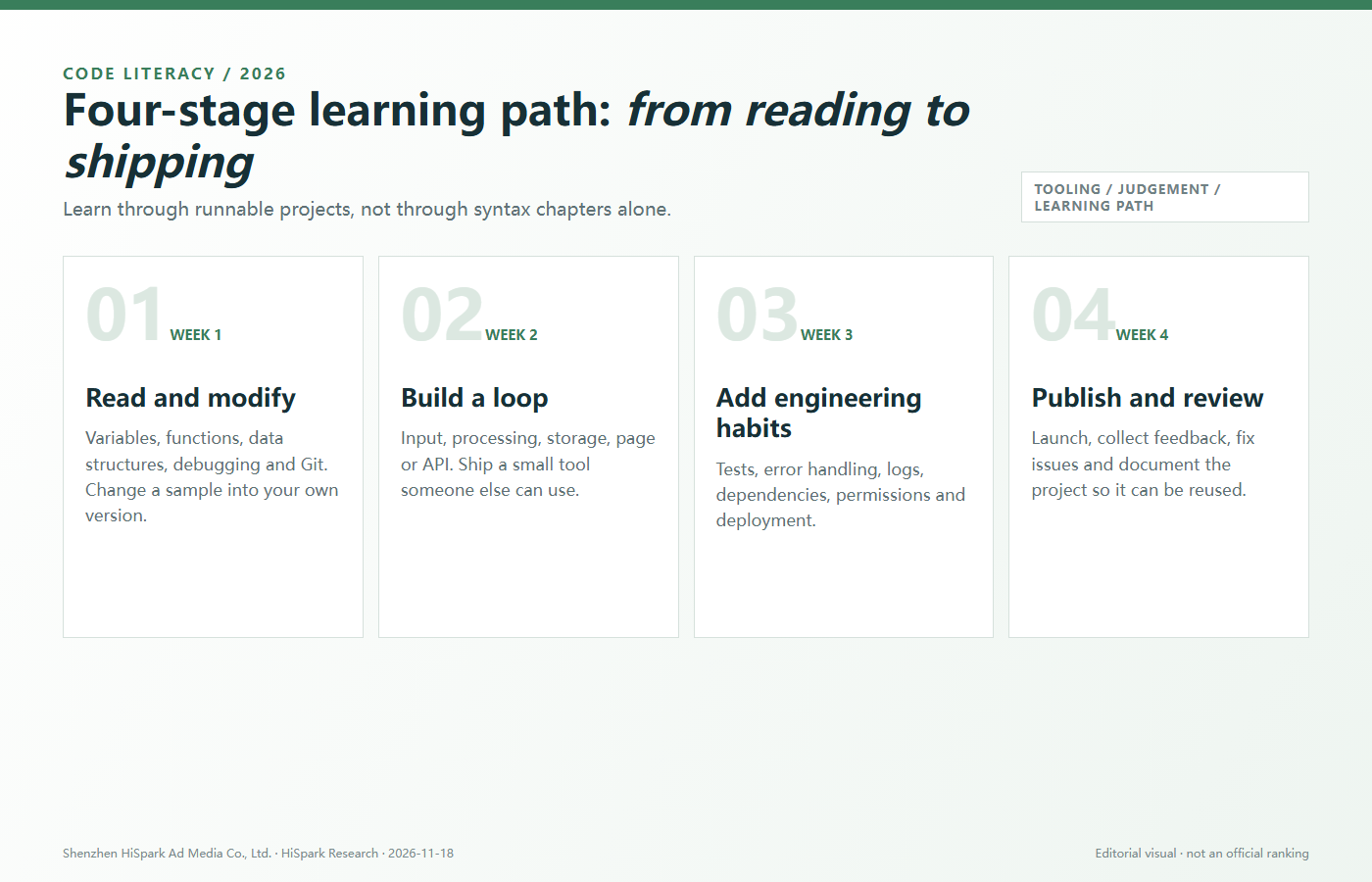
Tutorials can create the feeling of progress without the ability to ship. Split learning into four visible deliverables.
AI makes the first draft faster, which makes the ability to verify it more valuable. Prompting is not engineering. The real advantage is framing the problem, validating results and owning the outcome.
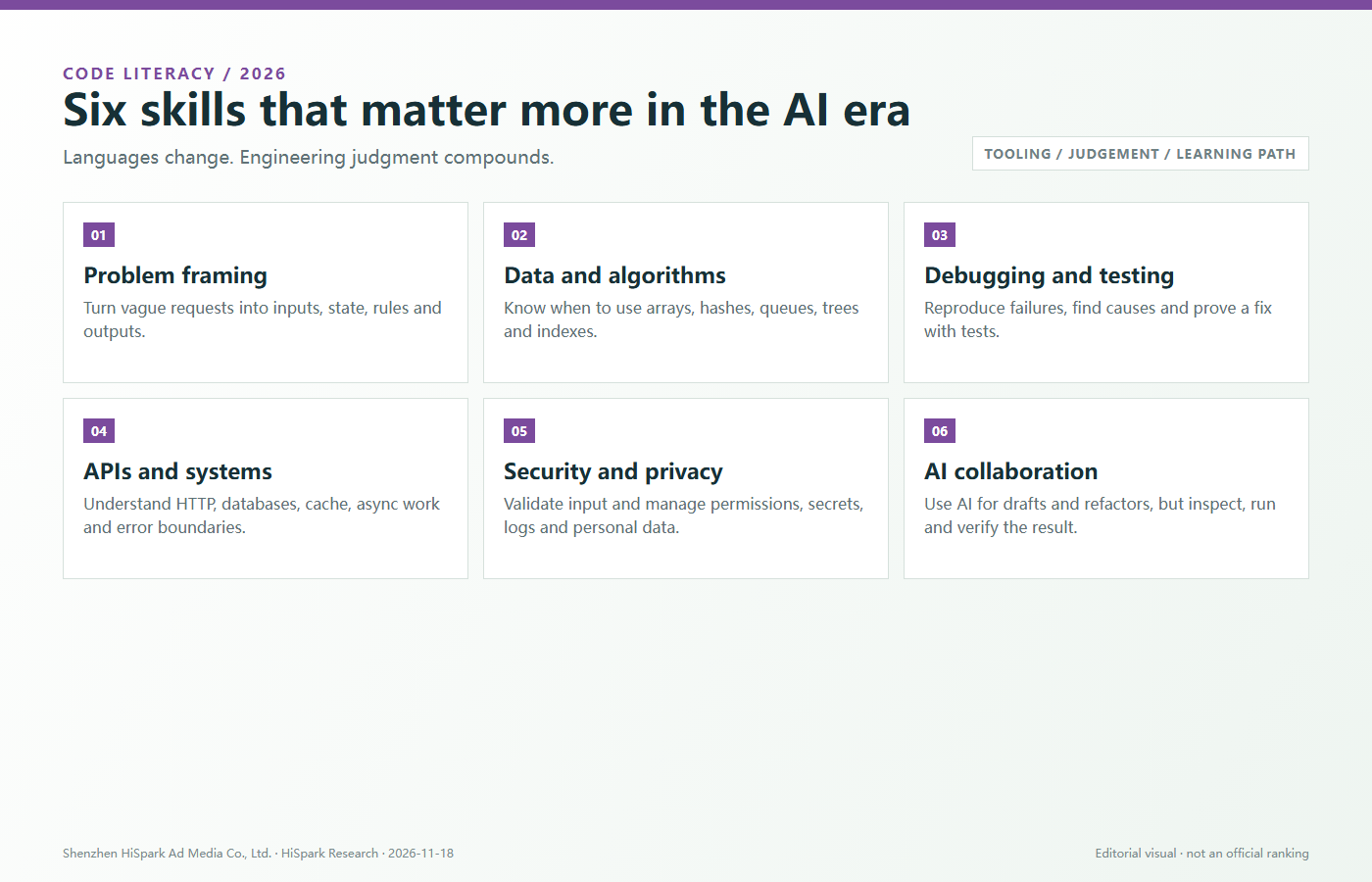
Turn vague requests into inputs, state, rules, outputs and constraints.
Know when to use arrays, hashes, queues, trees, indexes and asynchronous queues.
Reproduce the failure, find the cause, write a minimal test and prove the fix.
Understand HTTP, databases, caches, concurrency, retries and error boundaries.
Validate input and manage permissions, secrets, logs and personal data.
Use AI for drafts, refactors and explanations, but run, inspect, test and own the result.
Rankings differ by method, sample and purpose. They are not a project-selection decision.
Delivery also depends on frameworks, databases, testing, deployment, monitoring, security and collaboration.
Master one language through a working project before adding a second.
If the project does not need extreme control, extra complexity can slow delivery.
Without Git, rollback, collaboration and change investigation become much harder.
AI can accelerate a draft but cannot own security, data or business correctness.
Naming, tests, docs, error handling and dependency management determine how long code survives.
Choose Python for AI, data and automation. Choose JavaScript if the first goal is a web product, interaction or full stack. Finish one small working project either way.
They are not directly related. JavaScript runs mainly in browsers and Node.js. Java runs on the JVM and is common in enterprise backends and older Android code.
You need to understand JavaScript runtime behaviour, objects, functions, async work and the DOM, but not every advanced corner. TypeScript adds checks; it does not replace the runtime model.
Not in a simple way. Go is strong for cloud services and simple deployment. Java retains enterprise maturity. Python is especially strong in AI and data. They often work together.
Choose C++ first for game engines, graphics, media or existing C++ codebases. Consider Rust for new systems where safety and reliability are priorities. Both require computer-science fundamentals.
No. Kotlin also runs on the JVM and supports multiplatform work, but Android remains its strongest and most concentrated job market.
Yes, if you want to understand memory, operating systems, drivers, embedded systems or low-level runtimes. It can wait if your only goal is business web development.
AI changes how code is written, but people still frame requirements, make architecture trade-offs, test, secure, deploy and take responsibility. Strong fundamentals become more important for reviewing AI output.
SQL is a database query and manipulation language, generally classified as declarative. It can express complex logic, but it is not a general-purpose language for building full web or mobile apps.
Strictly speaking, no. HTML describes structure and CSS describes presentation. JavaScript owns interaction and logic. Web developers need to understand all three.
For native iOS, start with Swift. For native Android, start with Kotlin. If one codebase must cover both platforms, evaluate Dart/Flutter or another cross-platform approach.
It fits products that need iOS, Android, and sometimes web or desktop from one codebase, especially small teams and validation stages. Complex native capabilities may still require platform-specific work.
Yes for WordPress, content sites, international business websites, CMS platforms and many existing web systems. Modern PHP requires frameworks, dependency management, tests and security discipline.
Start with R for statistical research, biostatistics and specialised visualisation. Start with Python for AI, general data work, automation and backend integration. Data teams often use both.
At minimum, understand paths, permissions, processes, environment variables, pipes, logs and fail-fast behaviour, then write safe deployment or backup scripts.
It can be. Ruby and Rails make web product loops easy to understand, but you still need testing, databases and deployment. Check local jobs and ecosystem before committing.
The environment where code executes, such as a browser, JVM, .NET runtime or a compiled Go executable.
A tool that translates source code and can detect certain errors before execution.
Rules describing data shapes and valid operations. Static typing can catch certain problems before runtime.
A runtime mechanism that reclaims unused memory automatically. It reduces manual work but can still have performance cost.
The frameworks, libraries, tools, documentation, community and talent around a language.
A set of developer tools and interfaces for a platform or capability such as payments, ads, devices or cloud services.
A software foundation that provides structure and shared capabilities for a class of applications.
How easily code can be understood, changed, tested and extended after the first release.
Describes the desired result rather than every execution step. SQL is a common example.
Uses tags to describe structure and content, such as HTML. It is not a general-purpose programming language.
Describes how content should be presented, such as CSS controlling colour, spacing, layout and responsive behaviour.
A database management system responsible for storage, queries, permissions and transactions, such as PostgreSQL, MySQL or SQLite.
Converts source from one language or version into another, such as TypeScript into JavaScript.
The command-line environment of an operating system; Bash is common on Linux and macOS.
Official documentation is the first place to continue learning and verify language details.
Updated 2026-11-18. Language ecosystems change. Confirm frameworks, versions and hiring requirements against current project sources.
Send us the target platform, audience, current team, launch window and performance requirements. We can turn the language decision into a testable technical plan.